| Redress Manager 2026 Investments Adjustments in detail |
   |
The diagram below shows the adjustments available in an Investment related case.
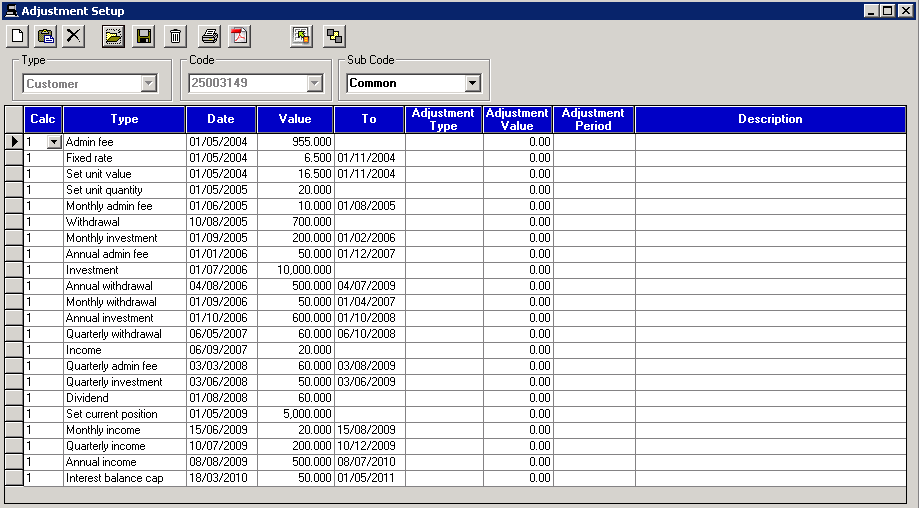
* The System Generate icon is not available in the adjustment setup when an Investment related case has been created.
Please note that descriptions can be added where required, however where not used the ‘Type’ will show on all printed results.
Admin fee
The admin fee adjustment is used as part of a loan or investment case e.g. for setting up the investment or an insurance premium. A date and an amount of fee is required, an end date is not needed for this adjustment.
Example: Set adjustment Admin fee 01/05/03 £210.00
Effect: Detailed recalc screen will show -210 in Payment/withdrawal column and £210 taken away from Period start position column on 01/05/03.
Monthly admin fee
The monthly admin fee adjustment is used as part of a loan or investment case as part of an insurance amount or cost. A date, an amount of fee and an end date is required for this adjustment.
Example: Set adjustment Monthly admin fee 01/05/20 £20.00 01/10/20
Effect: Detailed recalc screen will show -20 in Payment/withdrawal column and £20 taken away from Period start position column on 01/05/20 for 6 months
The 4 weekly admin fee adjustment is used as part of a loan or investment case. A date, an amount of fee and an end date is required for this adjustment.
Example: Set adjustment 4 weekly admin fee 01/05/20 £20.00 01/10/20
Effect: Detailed recalc screen will show -20 in Payment/withdrawal column and £20 taken away from Period start position column on 01/05/20 for 6 months.
Monthly accrued admin fee %
This adjustment calculates a fee based on the previous months' balances. This is only for fund related calculations and not interest related calculations and also share/SIPP accounts where fees are charged on daily balances. A start date, value and end date are required for this adjustment.
Example: Set adjustment Monthly accrued admin fee % 01/02/20 2% 01/03/20
Effect: The view detailed recalc screen will show a day by day breakdown for the period of the case and an entry in the Payment/Withdrawal column on 01/02/20.
Quarterly admin fee
The quarterly admin fee adjustment is used as part of a loan or investment case e.g. for setting up the investment. A date, amount of fee and end date is required.
Example: Set adjustment Quarterly admin fee 01/05/03 £210.00 01/05/04
Effect: Detailed recalc screen will show -210 in Payment/withdrawal column and £210 taken away from Period start position column on a quarterly basis from 01/05/03 until 01/05/04.
Annual admin fee
The annual admin fee adjustment is used as part of a loan or investment case. Alternatively, it could also be an insurance amount on a mortgage case. A date, an amount of fee and an end date is required for this adjustment.
Example: Set adjustment Annual admin fee 01/05/20 £200.00 01/05/23
Effect: Detailed recalc screen will show -200 in Payment/withdrawal column and £200 taken away from Period start position column on 01/05/20 for 4 years on an annual basis.
Annual admin fee %
This adjustment is used to charge an annual admin fee based on the percentage amount entered in as a value. It requires a start date, value and end date.
Example: Set adjustment Annual admin fee 01/11/21 4% 01/05/23 on £48,000 balance for interest
Effect: The view detailed recalc screen will show £1,920.00 in the payment/withdrawal column on 01/11/21 and £1,843.20 on 01/11/22. The Period start posiiton column will also show a decrease by the amount in the payment/withdrawal column.
Investment
This adjustment is used as part of investment cases when a customer makes a one off investment. A date and amount of payment is required, an end date is not required as it is not a recurring value.
Example: Set adjustment Investment 01/02/03 £2780.00
Effect: Detailed recalc screen will show £2780 as is in Payment/withdrawal column and £2780 added to Period start position column
Note: Group setting option of 'Investment periodic application' will affect adjustment and when investment is applied. From the dropdown, if 'Date specified' is selected, investment will apply on the date set for the adjustment. If 'Past weekend' is selected then if an investment falls onto a weekend date, the investment will be pushed forward to the next weekday. If 'Past weekend and Bank holidays' is selected then if an investment falls onto a weekend or bank holiday date, the investment will be pushed to the next week day.
Monthly Investment
This adjustment is used as part of investment cases when a customer makes a recurring monthly investment. A date, amount of payment and an end date is required as it is happening more than once.
Example: Set adjustment Monthly investment 01/02/03 £200.00 01/02/04
Effect: Detailed recalc screen will show £200 as is in Payment/withdrawal column and £200 added to Period start position column for a year from the date of 01/02/03.
Note: The group setting option of 'Investment periodic application' will affect adjustment and when investment is applied. From the dropdown, if 'Date specified' is selected, investment will apply on the date set for the adjustment. If 'Past weekend' is selected then if an investment falls onto a weekend date, the investment will be pushed forward to the next weekday. If 'Past weekend and Bank holidays' is selected then if an investment falls onto a weekend or bank holiday date, the investment will be pushed to the next week day.
4 weekly investment
This adjustment is used as part of investment cases when a customer makes a recurring 4 weekly investment. A date, amount of payment and an end date is required as it is happening more than once.
Example: Set adjustment 4 weekly investment 01/02/03 £200.00 01/02/04
Effect: Detailed recalc screen will show £200 as is in Payment/withdrawal column and £200 added to Period start position column on a 4 weekly basis for a year from the date of 01/02/03.
Quarterly investment
This adjustment is used as part of investment cases when a customer makes a quarterly investment. A date, amount of payment and end date is required.
Example: Set adjustment Quarterly investment 01/02/03 £280.00 01/02/05
Effect: Detailed recalc screen will show £280 as is in Payment/withdrawal column and £280 added to Period start position column on a quarterly basis from 01/02/03 until 01/02/05
The group setting option of 'Investment periodic application' will also affect adjustment and when investment is applied. From the dropdown, if 'Date specified' is selected, the investment will apply on the date set for the adjustment. If 'Past weekend' is selected then if an investment falls onto a weekend date, it will be pushed forward to the next weekday. If 'Past weekend and Bank holidays' is selected then if an investment falls onto a weekend or bank holiday date, the investment will be pushed to the next week day.
Annual investment
This adjustment is used as part of investment cases when a customer makes a recurring annual investment. A date, amount of payment and an end date is required as it is happening more than once.
Example: Set adjustment Annual investment 01/02/03 £2500.00 01/02/05
Effect: Detailed recalc screen will show £2500 as is in Payment/withdrawal column and £2500 added to Period start position column on an annual basis for three years from the date of 01/02/03.
Note: The group setting option of 'Investment periodic application' will affect adjustment and when investment is applied. From the dropdown, if 'Date specified' is selected, investment will apply on the date set for the adjustment. If 'Past weekend' is selected then if an investment falls onto a weekend date, the investment will be pushed forward to the next weekday. If 'Past weekend and Bank holidays' is selected then if an investment falls onto a weekend or bank holiday date, the investment will be pushed to the next week day.
Income
The income adjustment is for when a customer receives a single amount of income from their fund and should be entered by inputting a date of when the amount is received and an amount. An end date is not required.
Example: Set adjustment Income 01/03/22 450.00
Effect: Detailed recalc screen will show -450 in Payment/withdrawal column on 01/03/22
Please Note: The income adjustment shows on the rework screen but doesn't have an effect on the number of units the customer holds or the value of their investment until the end of the case. Care must be taken when deciding whether the user receives an income from their fund or if they are making a withdrawal and a withdrawal adjustment is needed to ensure adjustment matches what happened in real life.
Monthly income
This adjustment is used to specify a monthly income from a fund that the customer received. To add a monthly income the date period the customer received the income should be entered alongside the amount they received.
Example: Set adjustment Monthly income 01/03/22 250.00 01/08/22
Effect: Detailed recalc screen will show -250 in Payment/withdrawal column on a monthly basis until 01/08/22
Please Note: The monthly income adjustment shows on the rework screen on a monthly basis but doesn't have an effect on the number of units the customer holds or the value of their investment until the end of the case. Care must to be taken when deciding whether the user receives an income from their fund or if they are making a withdrawal and a withdrawal adjustment is needed to ensure adjustment matches what happened in real life.
4 weekly income
This adjustment is used to specify a 4 weekly income that the customer received from their fund. To add this adjustment the date period the customer received the income should be entered alongside the amount they received.
Example: Set adjustment 4 weekly income 01/03/22 250.00 01/08/22
Effect: Detailed recalc screen will show -250 in Payment/withdrawal column on a 4 week basis until 01/08/22
Please Note: The 4 weekly income adjustment shows on the rework screen on a 4 week basis but doesn't have an effect on the number of units the customer holds or the value of their investment until the end of the case. Care must to be taken when deciding whether the user receives an income from their fund or if they are making a withdrawal and a withdrawal adjustment is needed to ensure adjustment matches what happened in real life.
Annual income
This adjustment is used to specify an annual income that the customer received from their fund. To add this adjustment the date period the customer received the income should be entered alongside the amount they received.
Example: Set adjustment Annual income 01/06/22 180.00 01/06/24
Effect: Detailed recalc screen will show -180 in Payment/withdrawal column on an annual basis until 01/06/24
Please Note: The annual income adjustment shows on the rework screen on a 4 week basis but doesn't have an effect on the number of units the customer holds or the value of their investment until the end of the case. Care must to be taken when deciding whether the user receives an income from their fund or if they are making a withdrawal and a withdrawal adjustment is needed to ensure adjustment matches what happened in real life.
Quarterly income
This adjustment is used to specify a quarterly income that the customer received from their fund. To add a quarterly income the date period the customer received the income should be entered alongside the amount they received.
Example: Set adjustment Quarterly income 01/03/22 250.00 01/03/23
Effect: Detailed recalc screen will show -250 in Payment/withdrawal column on a quarterly basis until 01/03/23
Please Note: The quarterly income adjustment shows on the rework screen on a quarterly basis but doesn't have an effect on the number of units the customer holds or the value of their investment until the end of the case. Care must be taken when deciding whether the user receives an income from their fund or if they are making a withdrawal and a withdrawal adjustment is needed to ensure adjustment matches what happened in real life.
Withdrawal
This adjustment is used as part of investment case where a customer makes a withdrawal within a case. A date and amount of payment is required, an end date is not required as it is not a recurring value.
Example: Set adjustment Withdrawal 01/02/03 £1500.00
Effect: Detailed recalc screen will show -1500 in Payment/withdrawal column and £1500 taken away from Period start position column on 01/02/03
Please note that the Withdrawal adjustment will affect the balance at the point that it occurs. This differs from an Income adjustment which is displayed in the rework, however it does not show on the account until the end, where the total of the incomes is removed from the final balance in the comparison screen. The group setting option of 'Investment periodic application' will also affect adjustment and when withdrawal is applied. From the dropdown, if 'Date specified' is selected, the withdrawal will apply on the date set for the adjustment. If 'Past weekend' is selected then if a withdrawal falls onto a weekend date, it will be pushed forward to the next weekday. If 'Past weekend and Bank holidays' is selected then if a withdrawal falls onto a weekend or bank holiday date, the withdrawal will be pushed to the next week day.
Monthly withdrawal
This adjustment is used as part of investment case where a customer makes a monthly withdrawal within a case. A date, amount of payment and end date is required as it is happening more than once.
Example: Set adjustment Monthly withdrawal 01/02/03 £150.00 01/02/04
Effect: Detailed recalc screen will show -150 in Payment/withdrawal column and £150 taken away from Period start position column on a monthly basis for a year starting 01/02/03
Please note: A monthly withdrawal adjustment takes effect on the date adjustment is applied, reducing the number of units and the value of the investment. Care must to be taken when deciding if the customer made a withdrawal from their fund and are using their units to fund the sale or if they are taking an income from their fund, in which case an income adjustment would be needed. The group setting option of 'Investment periodic application' will also affect adjustment and when withdrawal is applied. From the dropdown, if 'Date specified' is selected, the withdrawal will apply on the date set for the adjustment. If 'Past weekend' is selected then if a withdrawal falls onto a weekend date, it will be pushed forward to the next weekday. If 'Past weekend and Bank holidays' is selected then if a withdrawal falls onto a weekend or bank holiday date, the withdrawal will be pushed to the next week day.
4 weekly withdrawal
This adjustment is used as part of investment case where a customer makes a 4 weekly withdrawal within a case. A date, amount of payment and end date is required as it is happening more than once.
Example: Set adjustment 4 weekly withdrawal 01/02/03 £150.00 01/02/04
Effect: Detailed recalc screen will show -150 in Payment/withdrawal column and £150 taken away from Period start position column on a 4 weekly basis for a year starting 01/02/03
Please note that the Withdrawal adjustment will affect the balance at the point that it occurs. This differs from an Income adjustment which is displayed in the rework, however it does not show on the account until the end, where the total of the incomes are removed from the final balance in the comparison screen.
Annual withdrawal
This adjustment is used as part of investment case where a customer makes an annual withdrawal within a case. A date, amount of payment and end date is required as it is happening more than once.
Example: Set adjustment Annual withdrawal 01/02/03 £3500.00 01/02/06
Effect: Detailed recalc screen will show -3500 in Payment/withdrawal column and £3500 taken away from Period start position column on an annual basis for 3 years starting 01/02/03
Please note: An annual withdrawal adjustment takes effect on the date adjustment is applied, reducing the number of units and the value of the investment. Care must to be taken when deciding if the customer made a withdrawal from their fund and are using their units to fund the sale or if they are taking an income from their fund, in which case an income adjustment would be needed. The group setting option of 'Investment periodic application' will also affect adjustment and when withdrawal is applied. From the dropdown, if 'Date specified' is selected, the withdrawal will apply on the date set for the adjustment. If 'Past weekend' is selected then if a withdrawal falls onto a weekend date, it will be pushed forward to the next weekday. If 'Past weekend and Bank holidays' is selected then if a withdrawal falls onto a weekend or bank holiday date, the withdrawal will be pushed to the next week day.
Quarterly withdrawal
This adjustment is used to specify a quarterly withdrawal made by the customer. To add a quarterly withdrawal the date period the customer made the withdrawals should be entered alongside the amount that was taken out.
Example: Set adjustment Quarterly withdrawal 01/02/03 £1500.00 01/02/04
Effect: Detailed recalc screen will show -1500 in Payment/withdrawal column and £1500 taken away from Period start position column on a quarterly basis on 01/02/03 until 01/02/04
Please note: A quarterly withdrawal adjustment takes effect on the date adjustment is applied, reducing the number of units and the value of the investment. Care must be taken when deciding if the customer made a withdrawal from their fund and are using their units to fund the sale or if they are taking an income from their fund, in which case an income adjustment would be needed.
The group setting option of 'Investment periodic application' will also affect adjustment and when withdrawal is applied. From the dropdown, if 'Date specified' is selected, the withdrawal will apply on the date set for the adjustment. If 'Past weekend' is selected then if a withdrawal falls onto a weekend date, it will be pushed forward to the next weekday. If 'Past weekend and Bank holidays' is selected then if a withdrawal falls onto a weekend or bank holiday date, the withdrawal will be pushed to the next week day.
Set unit value
The set unit value adjustment is used as part of investment cases. Any investments or withdrawals that are made in the case directly affect the unit value. A date, value for the unit amount and an end date is required.
Example: Set adjustment Set unit value 01/02/02 8.00 01/06/02
Effect: Detailed recalc screen will show the Value (p) column as 800 from 01/02/02 for 4 months not including June.
Set unit quantity
The set unit quantity adjustment is used as part of investment cases to set a starting position. A date and value for the unit amount is required. An end date is not required.
Example: Set adjustment Set unit quantity 01/02/02 150.00
Effect: Detailed recalc screen will show the Units column as 150.00 from 01/02/02 for the rest of the case unless another set unit quantity adjustment is added. The period start position column value will also change according to the value entered in ie.a higher value entered in, a higher period start position and vice versa.
Set current position
The set current position adjustment is used as part of investment cases to acknowledge the actual position value of a fund in calculation. A start date and value is required, an end date is not required.
Example: Set adjustment Set current position 11/08/2020 21,308.40
Effect: On the last day of the calculation (11/08/20) the detailed recalc will show the period start position as £21,308.40.
Please note that the set current position adjustment will override other adjustments (withdrawal/income) on the same day.
Unit change
This adjustment adds or removes units based on the current unit value in investment cases. To use this adjustment the from date and value is required. When using this adjustment, a positive value is an increase of the units and a negative value is a decrease.
Example: Set adjustment 01/01/21 Unit change 40.00
Effect: On the view detailed recalc screen, the Units column will see an increase of 40. The payment/ withdrawals column will show the current value of a unit multiplied by 40. The period start position will see an increase of the current value of a unit multiplied by 40.
Dividend
Where dividends are required the details on the main screen will filter through into the case. This adjustment allows the user to specify the actual dividend payment amount at a given time. Each dividend must be entered on an individual basis, e.g. one adjustment per payment.
Example: Customer receives dividend of £243.00 on 07/03/23
Set adjustment: Dividend 07/03/23 243.00
Effect: On the view detailed recalc screen, the Dividend column will have £243.00 on 07/03/23 and interest will begin to collect in the Dividend interest column (Dividend interest is set on the main calculation screen)
Please note that cases which include dividends require external information to be accessed. Therefore we recommend that delegates attend our Investment Related Training course in order to fully comprehend the capability of the system.
Please note that cases which include dividends require external information to be accessed. Therefore we recommend that delegates attend our Investment Related Training course in order to fully comprehend the capability of the system.
Fixed Rate
This adjustment is an interest rate adjustment. It will set the interest rate for the case as the amount defined within the specified date range when creating the adjustment. A start and end date will need to be specified to use this adjustment
Note: When this adjustment is used alongside the discount rate adjustment. The discount rate will be applied to the fixed rate if both adjustments have overlapping date ranges.
Example: Set adjustment Fixed rate: 01/01/01 6.5% 01/01/03
Discount rate: 01/01/01 2% 01/03/01
Effect: For month 1 and 2 of 2001, the interest rate applied will be 4.5%. After this, the fixed rate of 6.5% will be applied. The change in the interest rate can be seen in the interest rate % column of the detailed recalc screen.
Interest Balance Cap
When required (for Credit Card Payment Protection Insurance cases or offset accounts) this adjustment ensures that interest is refunded on the correct amount by allowing you to set an interest balance for which the case interest balance will not go above.
Example: Interest balance should be set at £2000 from 01/06/22 for 1 year
Set adjustment: Interest balance cap 01/06/22 2000.00 01/06/23
Effect: On detailed recalc screen Balance for interest column will have £2000 from 01/06/22 for the period of 1 year
Tax %
This adjustment enables you to change the tax % applied to interest calculations as the effect of this adjustment can be seen in the interest column. A start date, value and end date is required for this adjustment.
Example: Set adjustment tax% 01/04/21 40.00 01/04/22
Effect: In the view detailed recalc screen the interest column will show a 40% tax applied from 01/04/21 until 01/04/22. This will result in a reduction in the interest amount calculated.
Annual Dividend %
This adjustment allows a dividend % to be applied on an annual basis. This is based on the fund value. A date, amount and end date is required for this adjustment.
Example: Set adjustment Annual dividend % 10/03/22 6.00 01/03/25
Effect: On the view detailed recalc screen the Dividend column will show 6% of the Period start position in the Dividend column and the Dividend interest column will begin to populate. This will occur annually from 10/03/22 until 01/03/25. .
Annual unit change %
When using this adjustment, the amount of units will change on an annual basis by the percentage specified thereby increasing the fund value.
Example: Set adjustment Annual unit change % 02/01/23 5.00 02/01/25
Effect: On the view detailed recalc screen the Payment/Withdrawal column will show the amount calculated by using the percentage specified of the period start position; in this case 5 percent. The units column will also show an increase. This will occur annually from 02/01/23 until 02/01/25.
Advisor fee
This adjustment is used when a one-off advisor fee has been charged. A date and an amount is required for this adjustment, an end date is not required.
Example: Set adjustment Advisor fee 01/02/21 650.00
Effect: On the view detailed recalc screen the Net Payment column will show £650.00 added to the monthly payment.
4 weekly advisor fee
This adjustment is used when a 4 weekly advisor fee has been charged. A date, amount and end date is required for this adjustment.
Example: Set adjustment 4 weekly advisor fee 01/02/21 40.00 01/10/21
Effect: On the view detailed recalc screen the Net Payment column will show £40.00 added to the monthly payment on a 4 weekly basis until 01/10/21.
Monthly advisor fee
This adjustment is used when a monthly advisor fee has been charged. A date, amount and end date is required for this adjustment.
Example: Set adjustment Monthly advisor fee 01/02/21 60.00 01/10/21
Effect: On the view detailed recalc screen the Net Payment column will show £60.00 added to the monthly payment every month from 01/02/21 until 01/10/21.
Quarterly advisor fee
This adjustment is used when a quarterly advisor fee has been charged. A date, amount and end date is required for this adjustment.
Example: Set adjustment Quarterly advisor fee 01/02/21 30.00 01/10/22
Effect: On the view detailed recalc screen the Net Payment column will show £30.00 added to the monthly payment on a quarterly basis.
Annual advisor fee
This adjustment is used when an annual advisor fee has been charged. A date, amount and end date is required for this adjustment.
Example: Set adjustment Annual advisor fee 01/02/21 120.00 01/01/25
Effect: On the view detailed recalc screen the Net Payment column will show £120.00 added to the monthly payment on an annual basis starting 01/02/21 until 01/01/25.
Monthly accrued fee %
This adjustment calculates a fee based on the previous months' balances. This is only for fund related calculations and not interest related calculations and also share/SIPP accounts where fees are charged on daily balances. A start date, value and end date are required for this adjustment.
Example: Set adjustment Monthly accrued admin fee % 01/02/20 2% 01/03/20
Effect: The view detailed recalc screen will show a day by day breakdown for the period of the case and an entry in the Payment/Withdrawal column on 01/02/20.
Please note that some compound interest values will not be completely accurate when viewing on screen as this adjustment is for use with the system generator.
Related Topics
| Copyright© 1994-2026 Exasoft, All rights reserved. | |