| Redress Manager 2026 Whole of Life Policy Adjustments in detail |
   |
The Whole of Life Policy adjustments are as illustrated in the diagram below. These adjustments seem like a trimmed down version of the Investments adjustments with the inclusion of ‘Surrender Value’.
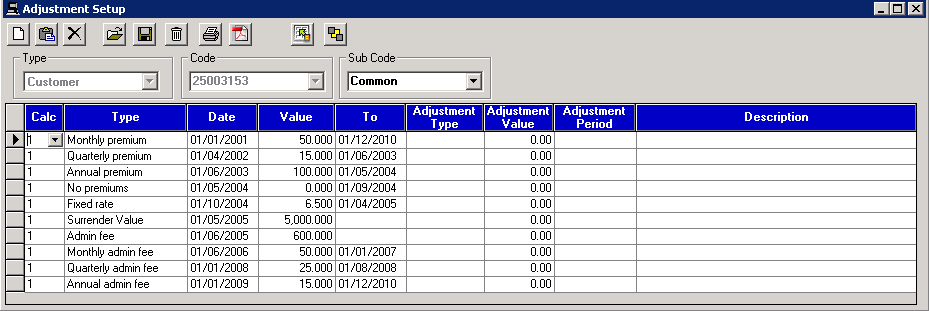
* The System Generate icon is also not available in the Whole of Life policy adjustment setup.
Monthly premium
This adjustment should be used for all insurance premiums such as endowment/DTA (decreasing term assurance). Date ranges and amount are required for the adjustment to work. Additional fields are available in the case of further changes to the adjustment.
Standard premium example: 01/01/01 195.00 01/01/03
Effect: This will apply a monthly premium of £195.00 for two years. This will be added to the Net payment column in the detailed recalc screen.
Low start plan premium example: 01/01/01 195.00 01/01/03 Simple% 20 Years 1-2
This will start the monthly premium at 195.00 and increase this by 20% over the first year and 20% again at the end of the second year.
4 weekly premium
This adjustment should be used for all insurance premiums such as endowment/DTA (decreasing term assurance) that occur on a 4 weekly basis. Date ranges and amount are required for the adjustment to work. Additional fields are available in the case of further changes to the adjustment.
Standard premium example: 01/01/01 195.00 01/01/03
Effect: This will apply a 4 weekly premium of £195.00 for two years. This will be added to the Net payment column in the detailed recalc screen.
Low start plan premium example: 01/01/01 195.00 01/01/03 Simple% 20 Years 1-2
This will start the monthly premium at 195.00 and increase this by 20% over the first year and 20% again at the end of the second year.
Quarterly premium
This adjustment should be used for all insurance premiums such as endowment/DTA (decreasing term assurance) that occur on quarterly basis. Date ranges and amount are required for the adjustment to work. Additional fields are available in the case of further changes to the adjustment.
Standard premium example: 01/01/01 195.00 01/01/03
Effect: This will apply a quarterly premium of £195.00 for two years. This will be added to the Net payment column in the detailed recalc screen.
Low start plan premium example: 01/01/01 195.00 01/01/03 Simple% 20 Years 1-2
This will start the quarterly premium at 195.00 and increase this by 20% over the first year and 20% again at the end of the second year. Annual premium
The annual premium takes into account the premiums paid annually. Date ranges and amount of premium are required.
No premiums
This adjustment should be used for all insurance premiums such as endowment/DTA (decreasing term assurance) that occur on quarterly basis. Date ranges and amount are required for the adjustment to work. Additional fields are available in the case of further changes to the adjustment.
Standard premium example: 01/01/01 195.00 01/01/03
Effect: This will apply a quarterly premium of £195.00 for two years. This will be added to the Net payment column in the detailed recalc screen.
Low start plan premium example: 01/01/01 195.00 01/01/03 Simple% 20 Years 1-2
This will start the quarterly premium at 195.00 and increase this by 20% over the first year and 20% again at the end of the second year.
Fixed Rate
This adjustment is an interest rate adjustment. It will set the interest rate for the case as the amount defined within the specified date range when creating the adustment. A start and end date will need to be specified to use this adjustment
Note: When this adjustment is used alongside the discount rate adjustment. The discount rate will be applied to the fixed rate if both adjustments have overlapping date ranges.
Example: Set adjustment Fixed rate: 01/01/01 6.5% 01/01/03
Discount rate: 01/01/01 2% 01/03/01
Effect: For month 1 and 2 of 2001, the interest rate applied will be 4.5%. After this, the fixed rate of 6.5% will be applied. The change in the interest rate can be seen in the interest rate % column of the detailed recalc screen.
Surrender Value
This adjustment is used for endowment cases and used to specify policy surrender values. The surrender value is the amount paid when an insurance policy is cancelled before it reaches the agreed maturity date. Both the date and amount fields are required for the surrender value to have an impact on the calculation, start date of adjustment must be the end date of the calculation
Example: Set adjustment Surrender value 01/02/21 32,220.45
Effect: On the last day of the calculation 01/02/21 the amount of 32,220.45 will be removed from any redress due
Group settings can also affect this adjustment:
- Remove increase - This is the system default selection that will reduce the redress value by the positive amount entered in for the surrender value
- Add decrease - This option will add the surrender value onto the redress if a negative value is entered
- Both Add and Remove - This option will combine the actions of Remove increase and Add decrease
- None - This option will mean the surrender value has no effect on the redress value.
Admin fee
The admin fee adjustment is used as part of a loan or investment case e.g. for setting up the investment or an insurance premium. A date and an amount of fee is required, an end date is not needed for this adjustment.
Example: Set adjustment Admin fee 01/05/03 £210.00
Effect: Detailed recalc screen will show -210 in Payment/withdrawal column and £210 taken away from Period start position column on 01/05/03.
Monthly admin fee
The monthly admin fee adjustment is used as part of a loan or investment case as part of an insurance amount or cost. A date, an amount of fee and an end date is required for this adjustment.
Example: Set adjustment Monthly admin fee 01/05/20 £20.00 01/10/20
Effect: Detailed recalc screen will show -20 in Payment/withdrawal column and £20 taken away from Period start position column on 01/05/20 for 6 months.
4 weekly admin fee
The 4 weekly admin fee adjustment is used as part of a loan or investment case. A date, an amount of fee and an end date is required for this adjustment.
Example: Set adjustment 4 weekly admin fee 01/05/20 £20.00 01/10/20
Effect: Detailed recalc screen will show -20 in Payment/withdrawal column and £20 taken away from Period start position column on 01/05/20 for 6 months.
Monthly accrued admin fee %
This adjustment calculates a fee based on the previous months' balances. This is only for fund related calculations and not interest related calculations and also share/SIPP accounts where fees are charged on daily balances. A start date, value and end date are required for this adjustment.
Example: Set adjustment Monthly accrued admin fee % 01/02/20 2% 01/03/20
Effect: The view detailed recalc screen will show a day by day breakdown for the period of the case and an entry in the Payment/Withdrawal column on 01/02/20.
Quarterly admin fee
The quarterly admin fee adjustment is used as part of a loan or investment case e.g. for setting up the investment. A date, amount of fee and end date is required.
Example: Set adjustment Quarterly admin fee 01/05/03 £210.00 01/05/04
Effect: Detailed recalc screen will show -210 in Payment/withdrawal column and £210 taken away from Period start position column on a quarterly basis from 01/05/03 until 01/05/04.
Annual admin fee
The annual admin fee adjustment is used as part of a loan or investment case. Alternatively, it could also be an insurance amount on a mortgage case. A date, an amount of fee and an end date is required for this adjustment.
Example: Set adjustment Annual admin fee 01/05/20 £200.00 01/05/23
Effect: Detailed recalc screen will show -200 in Payment/withdrawal column and £200 taken away from Period start position column on 01/05/20 for 4 years on an annual basis.
Annual admin fee %
This adjustment is used to charge an annual admin fee based on the percentage amount entered in as a value. It requires a start date, value and end date.
Example: Set adjustment Annual admin fee 01/11/21 4% 01/05/23 on £48,000 balance for interest
Effect: The view detailed recalc screen will show £1,920.00 in the payment/withdrawal column on 01/11/21 and £1,843.20 on 01/11/22. The Period start position column will also show a decrease by the amount in the payment/withdrawal column.
Tax %
This adjustment enables you to change the tax % applied to interest calculations as the effect of this adjustment can be seen in the interest column. A start date, value and end date is required for this adjustment.
Example: Set adjustment tax% 01/04/21 40.00 01/04/22
Effect: In the view detailed recalc screen the interest column will show a 40% tax applied from 01/04/21 until 01/04/22. This will result in a reduction in the interest amount calculated.
Advisor fee
This adjustment is used when a one-off advisor fee has been charged. A date and an amount is required for this adjustment, an end date is not required.
Example: Set adjustment Advisor fee 01/02/21 650.00
Effect: On the view detailed recalc screen the Net Payment column will show £650.00 added to the monthly payment.
4 weekly advisor fee
This adjustment is used when a 4 weekly advisor fee has been charged. A date, amount and end date is required for this adjustment.
Example: Set adjustment 4 weekly advisor fee 01/02/21 40.00 01/10/21
Effect: On the view detailed recalc screen the Net Payment column will show £40.00 added to the monthly payment on a 4 weekly basis until 01/10/21.
Monthly advisor fee
This adjustment is used when a monthly advisor fee has been charged. A date, amount and end date is required for this adjustment.
Example: Set adjustment Monthly advisor fee 01/02/21 60.00 01/10/21
Effect: On the view detailed recalc screen the Net Payment column will show £60.00 added to the monthly payment every month from 01/02/21 until 01/10/21.
Quarterly advisor fee
This adjustment is used when a quarterly advisor fee has been charged. A date, amount and end date is required for this adjustment.
Example: Set adjustment Quarterly advisor fee 01/02/21 30.00 01/10/22
Effect: On the view detailed recalc screen the Net Payment column will show £30.00 added to the monthly payment on a quarterly basis.
Annual advisor fee
This adjustment is used when an annual advisor fee has been charged. A date, amount and end date is required for this adjustment.
Example: Set adjustment Annual advisor fee 01/02/21 120.00 01/01/25
Effect:
On the view detailed recalc screen the Net Payment column will show £120.00
added to the monthly payment on an annual basis starting 01/02/21 until 01/01/25.
Premium Adjustments in details
The available adjustments for Premium roll-up cases are different to that of a normal investment case and these are shown in the diagram below:
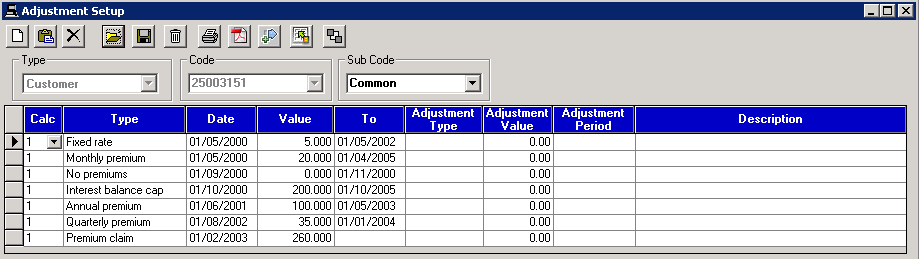
*On the investments screen, the System Generate icon becomes available in the adjustment setup if a Premium Roll up case has been created.
Fixed Rate
This adjustment is an interest rate adjustment. It will set the interest rate for the case as the amount defined within the specified date range when creating the adustment. A start and end date will need to be specified to use this adjustment
Note: When this adjustment is used alongside the discount rate adjustment. The discount rate will be applied to the fixed rate if both adjustments have overlapping date ranges.
Example: Set adjustment Fixed rate: 01/01/01 6.5% 01/01/03
Discount rate: 01/01/01 2% 01/03/01
Effect: For month 1 and 2 of 2001, the interest rate applied will be 4.5%. After this, the fixed rate of 6.5% will be applied. The change in the interest rate can be seen in the interest rate % column of the detailed recalc screen.
Monthly premium
This adjustment should be used for all insurance premiums such as endowment/DTA (decreasing term assurance). Date ranges and amount are required for the adjustment to work. Additional fields are available in the case of further changes to the adjustment.
Standard premium example: 01/01/01 195.00 01/01/03
Effect: This will apply a monthly premium of £195.00 for two years. This will be added to the Net payment column in the detailed recalc screen.
Low start plan premium example: 01/01/01 195.00 01/01/03 Simple% 20 Years 1-2
This will start the monthly premium at 195.00 and increase this by 20% over the first year and 20% again at the end of the second year.
Quarterly premium
This adjustment should be used for all insurance premiums such as endowment/DTA (decreasing term assurance) that occur on quarterly basis. Date ranges and amount are required for the adjustment to work. Additional fields are available in the case of further changes to the adjustment.
Standard premium example: 01/01/01 195.00 01/01/03
Effect: This will apply a quarterly premium of £195.00 for two years. This will be added to the Net payment column in the detailed recalc screen.
Low start plan premium example: 01/01/01 195.00 01/01/03 Simple% 20 Years 1-2
This will start the quarterly premium at 195.00 and increase this by 20% over the first year and 20% again at the end of the second year.
Annual premium
This adjustment is used when endowment / insurance premiums are paid on an annual basis. They are entered in the same way as monthly premiums and can increase by either a fixed amount or a percentage over a defined period, using “Adjustment Type”, “Adjustment Value” and “Adjustment Period”.
Example: Standard annual premium example: 01/01/01 1195.00 01/01/03
Effect: This will apply an annual premium of £1,195.00 for two years. The net payment column will show this payment on the view detailed recalc screen
Low start plan annual premium example: 01/01/01 2000.00 01/01/03 Simple% 10 Years 1-2
This will start the annual premium at £2000 and then increase this by 10% over the first two years.
No premiums
This adjustment can be used to indicate when a premium has not been paid. During the period this adjustment is applied, any premiums will be taken off of the calculation e.g. if a customer has not made any payments during a claim period. This ‘No Premiums’ adjustment works in a similar way to the ‘Missed Premiums’ adjustment for a mortgage case.
Example: Case has a regular premium where customer is paying £39 every month. Customer made a claim for the three months of February, March and April 2019 therefore will require a no premiums adjustment.
Set adjustment No premiums 01/02/19 0.00 01/05/19
Effect: For February, March and April there will not be any premiums registered on the account.
Premium claim
This adjustment is used when a claim has been upheld within a PPI calculation to acknowledge the claim being paid. The adjustment works in a similar way to the Surrender Value adjustment within a Mortgage Endowment complaint case, where the value is deducted from the result at the end of the calculation.
Example: Calculation has redress due of £29,910
Set adjustment Premium claim 11/04/24 319.00
Effect: The calculation summary comparison will have the statement 'Total on 11/04/24 is reduced by a premium claim of £319.00, leaving a balance of £29,591.00'. Redress will be £29,591.00.
The view detailed recalc screen does not show the effect of the adjustment.
Interest balance cap
When required (for Credit Card Payment Protection Insurance cases or offset accounts) this adjustment ensures that interest is refunded on the correct amount by allowing you to set an interest balance for which the case interest balance will not go above.
Example: Interest balance should be set at £2000 from 01/06/22 for 1 year
Set adjustment: Interest balance cap 01/06/22 2000.00 01/06/23
Effect: On detailed recalc screen Balance for interest column will have £2000 from 01/06/22 for the period of 1 year.
Tax %
This adjustment enables you to change the tax % applied to interest calculations as the effect of this adjustment can be seen in the interest column. A start date, value and end date is required for this adjustment.
Example: Set adjustment tax% 01/04/21 40.00 01/04/22
Effect: In the view detailed recalc screen the interest column will show a 40% tax applied from 01/04/21 until 01/04/22. This will result in a reduction in the interest amount calculated.
Related Topics
| Copyright© 1994-2026 Exasoft, All rights reserved. | |