| Redress Manager 2026 Investment / Pension consolidation screen |
   |
Calculation
details for selected item Calculation
Part (A-N) Actual,
notional and process tabs added separately

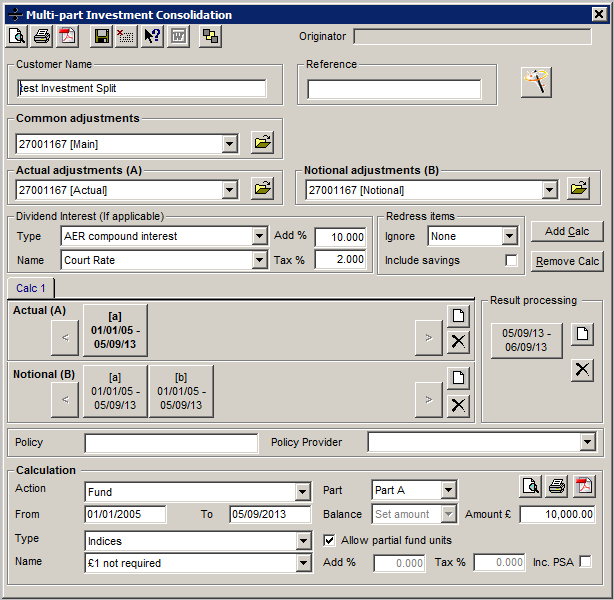


Again, from this you can see the actual and notional tabs don’t have to line up.
|
a) |
Customer Name |
|
b) |
Reference |
|
c) |
Policy |
|
d) |
Policy provider |
|
e) |
Action (select from Dropdown option) the type of action for this tab |
|
f) |
Calculation Part for this tab |
|
g) |
From date |
|
h) |
To date |
|
i) |
Balance type (Set amount, CFWD, Increase, Decrease) |
|
k) |
Amount based on above balance type |
|
l) |
Fund type or interest calculation method |
|
m) |
Fund name or interest table |
|
n) |
Allow partial funds (e.g. up to 3 decimal places) |
|
o) |
Add additional % to selected interest rate |
|
p) |
Remove Tax % from calculate interest |
|
q) |
Inc. PSA (Personal savings allowance) |
|
|
|
|
|
Run wizard |
|
|
Calculate and display results on screen (comparison and detailed depending on where selected from) |
|
|
|
|
|
Calculate and print to printer (comparison and detailed depending on where selected from) |
|
|
|
|
|
Create PDF file (comparison and detailed depending on where selected from). When selecting this option you will be requested to enter a file name for the file. PDF files replicate printed output and FREE readers are available. |
|
|
|
|
|
Verify screen |
|
|
|
|
|
Save current data for client |
|
|
|
|
|
Exit current screen |
|
|
|
|
|
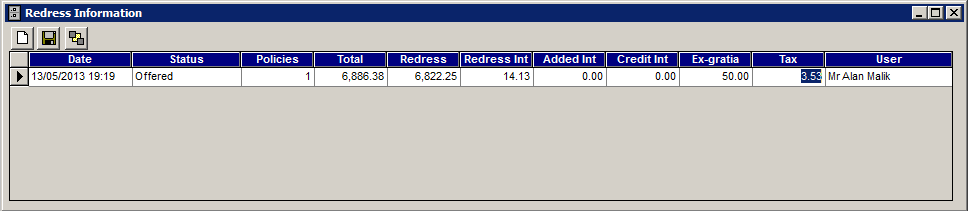
Redress Status allows the user to record the redress amount through different stages of the calculation process. |


Related Topics
| Copyright© 1994-2026 Exasoft, All rights reserved. | |