| Redress Manager 2026 Redress + Interest setup (FOS change 1ST January 2026) |
   |
To change the setup for the interest rate used by default, Click Admin> Group Settings to open the Group settings page.
Set the Redress + Interest to;
· Rate to be used - Bank of England Base Rate
· Additional % rate - 1%
· Method - Simple % Total
· Remove tax % - 20.000
· Surrender effect - Remove increase
Set the Premiums Interest and Refund Monthly payment calculations to;
· Rate to be used - Bank of England Base Rate
· Additional % rate - 1%
· Method - Simple % Monthly
· Remove tax % - 20.000
· Surrender effect - Remove increase
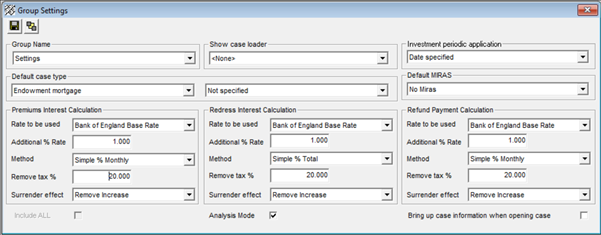
Whilst running standard calculations and selecting the action ‘Redress + Interest’, Bank of England Base rate + 1 % will apply. This will also apply when carrying out a Premiums + Interest or Refund Payment calculation.
The Tax % can differ for different types of calculations, please consult the Financial Ombudsman Service for further advice.
Related Topics
| Copyright© 1994-2026 Exasoft, All rights reserved. | |