| Redress Manager 2026 System Adjustment Generator within Mortgage cases |
   |
The following example highlights how the System Generator calculates an adjustment set based on the Set Mortgage payment adjustment. The System Generator was created to remove the need for users to calculate the required monthly payment / override by hand. It is not acceptable to use the Set Mortgage payment adjustments for CP75 calculations, unless the appropriate difference is calculated for both the Interest only mortgage and the hypothetical Capital Repayment mortgage. This is achieved by using the System Adjustment Generator.
In a live scenario we would use Main as the actual for the system adjustment generator and use the generated adjustment set as the common adjustment set. The endowment adjustment set would then contain just the endowment premiums and surrender values and the repayment adjustment set would contain the DTA premiums (if appropriate).
Things to note;
1.
We
would include all the common adjustments as normal in Main and run this through
the system adjustment generator (e.g. rates etc.)
2.
Care
needs to be taken when using the Set Mortgage payment and other adjustments
that affect the payment made (e.g. lump sum, override etc.). When using the Set
Mortgage payment adjustment you are telling the system the actual payment that
was made, which should include any additional payments.
3.
For
deferred cases where deferred Repayment mortgages were not available, we would
initially include the deferred elements in the Main adjustment set and
following the generation these would then be removed from the system generated
Main adjustment set. They are then included in the Endowment adjustment set
only.
4. Using payment adjustments alongside the Set Mortgage payment adjustment can give inconsistent results (one overriding the other).
* ALWAYS CHECK THE SYSTEM GENERATED FILE TO ENSURE YOU ARE HAPPY WITH THE RESULTS *
Example
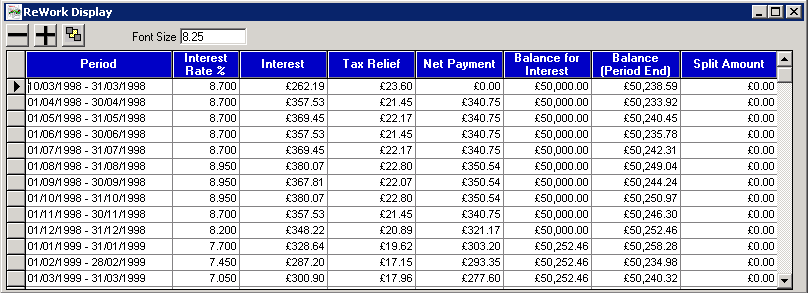
As we can see the lender net payment charged between 01/04/1998 - 01/07/1998 was £340.75 and on 01/08/1998 - 31/10/1998 the payment was £350.54. We use the following adjustment set to reflect the actual payment made by the customer of £345.00 for the period 01/05/1998 - 01/10/1998.
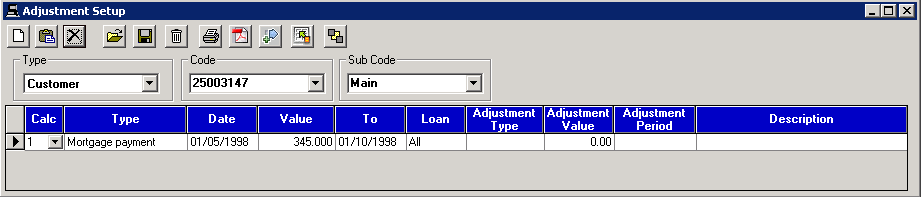
As you can see below the payments from 01/05/1998 - 30/09/1998 are all set to £345.00. To achieve the correct results on the repayment side we need to use the difference to the normal value. This is what the System generator option is used for.
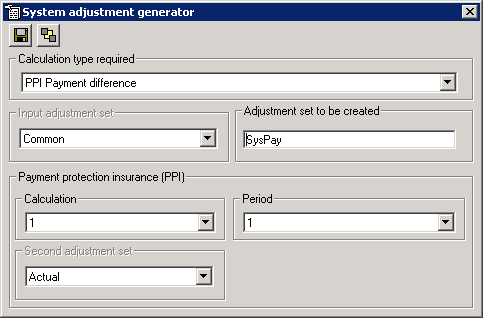
Generate an adjustment set using the Main adjustments (System defaults to using Sys_ plus the name of the adjustment set; this can be altered). Ensure that you select the Endowment complaints as Calculation type required.
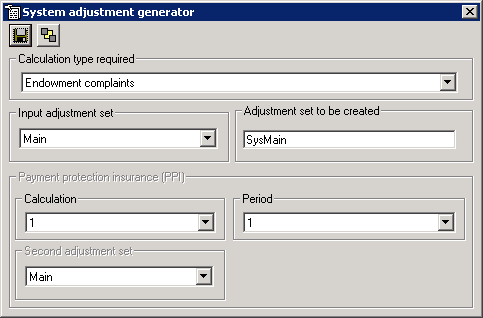
The following adjustment set was generated using the System Generator option; this correctly adjusts the amounts using overrides and monthly payments.
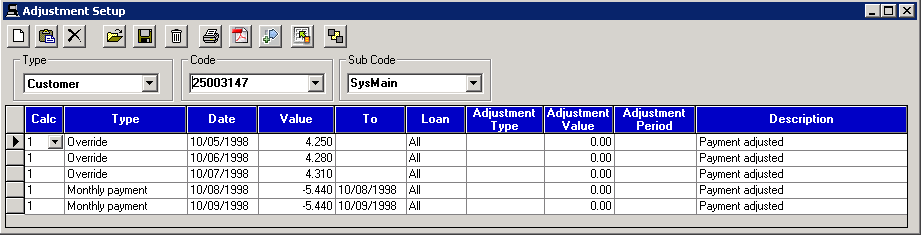
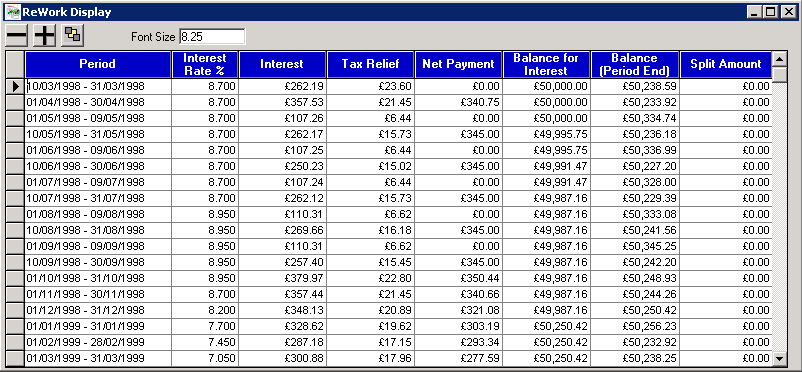
The following result set was created using the above adjustments and as you can see this adjustment set has worked in the same manner as the Set Mortgage payment adjustment set. The only difference between the two adjustment sets is that this one can be used against the interest only and capital repayment calculations.
System Adjustment Generator within PPI cases
In Payment Protection Insurance cases, you are looking at calculating the difference in payments from what the customer ‘did do’ to what they ‘should have done’. Therefore in the majority of cases you only need to select the ‘PPI Payment difference’ option. See the System Adjustment Generator Options section to familiarise yourself with available options for different case types. Please ensure you select the right option for your calculation.
Note: Interest differences are NOT generated for Loan methods where the method adds interest upfront.
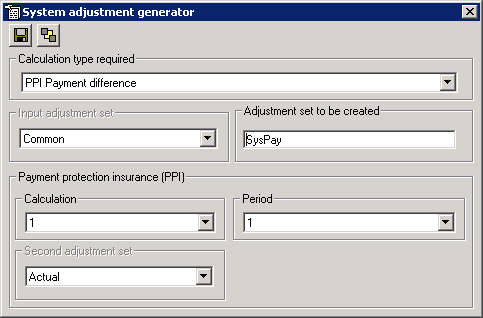
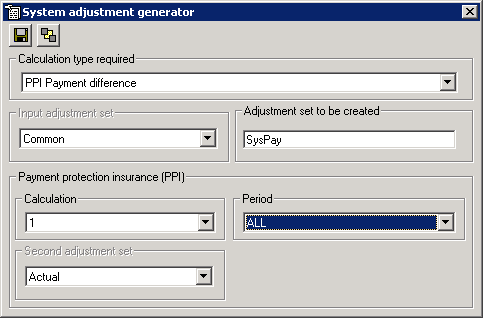
For comparison calculations with two (2) or more tabs you may select ‘ALL’ for the Period. This will generate an adjustment set based on ALL the periods. Note that system adjustments are only generated for Loan and Mortgage tabs and not other types of calculations.
Example
Let’s assume you have filled in the case details on the multi-lender screen and you are working on a case with fixed rate 7.42% as shown below.
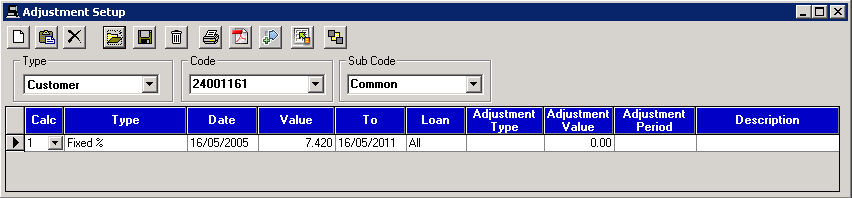
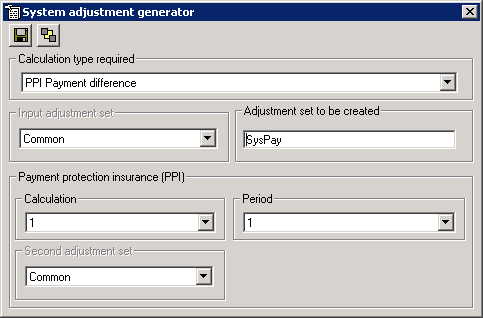
Click on  to access the System Adjustment Generator.
Please make sure the correct ‘calculation type required’ is selected.
to access the System Adjustment Generator.
Please make sure the correct ‘calculation type required’ is selected.
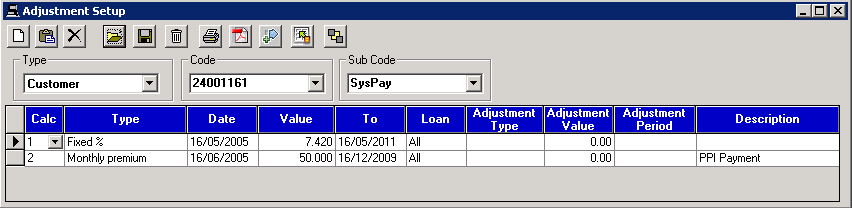
Run the System
Adjustment Generator by clicking on  . The difference in payments is automatically
calculated and allocated to the correct calculation (Calc 2 as shown). The
generated set is held in a separate adjustment set called SysPay.
. The difference in payments is automatically
calculated and allocated to the correct calculation (Calc 2 as shown). The
generated set is held in a separate adjustment set called SysPay.
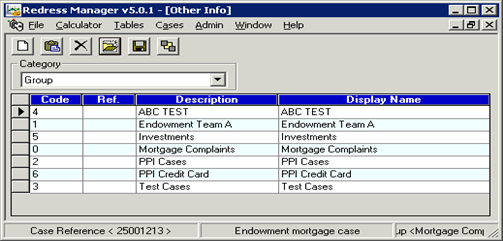
Extreme care must be taken to ensure this key reference information isn’t removed or altered by inexperienced users.
|
a) |
Category of information to be changed. This may be Contact Type, Marital Status, Country, Residential Status, Title, Lender, Group, Team, Product Provider, Redress Status and Next Contact Type. |
|
b) |
Code to use for item |
|
c) |
Reference code for item |
|
d) |
Description of item |
|
e) |
Display name of item |
|
|
|
|
|
Retrieve selected table |
|
|
|
|
|
Add new entry to end of table |
|
|
|
|
|
Insert new entry prior to selected entry |
|
|
|
|
|
Delete selected item |
|
|
|
|
|
Save table |
|
|
|
|
|
Exit current screen |



Related Topics
| Copyright© 1994-2026 Exasoft, All rights reserved. | |